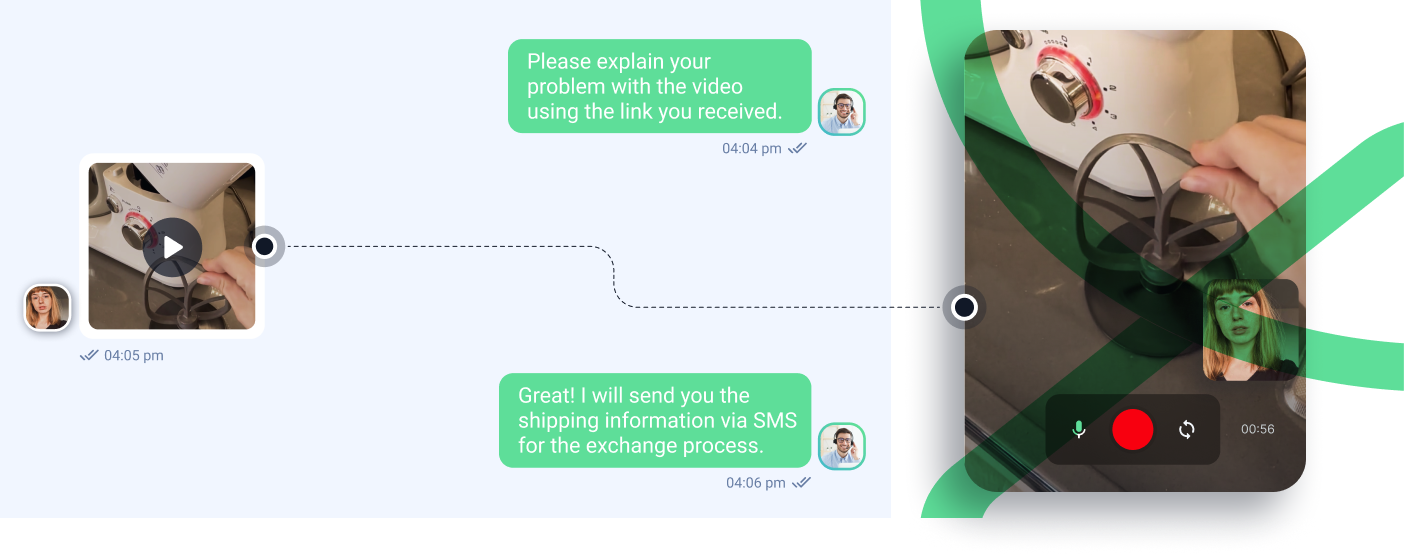

Hey CX pros! Today, let’s dive deep into why visual support isn’t just another buzzword but a real game-changer in our customer success toolkit.
Enhancing Customer Experience: When a Picture Is Worth a Thousand Tickets
Let’s face it – traditional support can sometimes feel like playing charades with customers. But throw visual support into the mix, and boom! The numbers speak for themselves. According to Gartner, companies implementing visual support solutions see a whopping 40% reduction in average handling time (AHT). Not too shabby, right?
Here’s what’s really cooking: When agents can see what customers see, first-contact resolution (FCR) rates typically jump by 25-30%. Think about it – no more “click the blue button… no, the other blue button” conversations! Plus, customer satisfaction scores (CSAT) consistently show a 20% boost when visual support tools are properly implemented.
Real talk: Visual support transforms those frustrating “I can’t explain what’s wrong” moments into smooth sailing. It’s like giving your support team X-ray vision into customer issues!
The Role of Visuals in Communication: Why Our Brains Love Show-and-Tell
Here’s some CX science for you: our brains process visual information 60,000 times faster than text. Mind-blowing, right? This isn’t just cool neuroscience – it’s a massive opportunity for support efficiency.
Visual communication taps into what UX nerds call the “picture superiority effect.” When customers receive information through visuals, they retain 65% of it three days later, compared to just 10% with text alone. That’s why tools like screen sharing, video tutorials, and annotated screenshots are absolute gold for:
- Onboarding flows (cutting time-to-value by up to 40%)
- Troubleshooting complex technical issues (reducing repeat contacts by 28%)
- Product feature adoption (boosting engagement rates by 32%)
Visual storytelling is particularly clutch when explaining those head-scratching technical concepts. Instead of sending a wall of text explaining your API integration process, a simple annotated screenshot or quick video walkthrough can turn those “I’m lost” tickets into “Aha!” moments.
Remember, in the age of TikTok and Instagram, your customers are more visually oriented than ever. By speaking their language through visual support, you’re not just solving problems – you’re creating experiences that stick.
Building Trust and Inclusivity with Visuals: Creating Support That Works for Everyone
Multilingual Support and Localization: Breaking Down Global Barriers
Hey CX champions! Ready to take your visual support worldwide? Let’s explore how to make your visual content resonate with customers across the globe while keeping that personal touch.
Translating Visual Content for Global Reach: More Than Just Words
Listen up – 76% of customers prefer products in their native language. But here’s the kicker: visual support needs more than just text translation to truly connect. Here’s your global playbook:
Visual translation best practices:
- Use language-agnostic icons where possible (reducing translation needs by 30%)
- Create modular designs for easy text replacement
- Implement right-to-left (RTL) layout support
- Use flexible layouts that accommodate text expansion (German text is typically 35% longer than English!)
Pro tip: Build a Visual Translation Memory (VTM) system to maintain consistency across all your localized content. This can cut localization costs by up to 40%!
Adapting Visuals to Cultural Norms and Sensitivities: The Art of Cultural Intelligence
Here’s the deal: what works in New York might flop in Tokyo. Cultural adaptation isn’t just nice-to-have – it’s business-critical. Check out these cultural customization strategies:
Color considerations:
- Red means “danger” in the US but “prosperity” in China
- White symbolizes “purity” in Western cultures but “mourning” in some Asian cultures
- Avoid color combinations with religious or political associations
Image adaptations:
- Use culturally appropriate hand gestures
- Consider local business attire standards
- Adapt date formats and number systems
- Respect religious and cultural symbols
Ensuring Accessibility in Visual Support: Leave No Customer Behind
Alt Text and Descriptions for Screen Readers: Making the Invisible Visible ️
Real talk: 15% of the world’s population lives with some form of disability. Making your visual support accessible isn’t just right – it’s smart business!
Best practices for alt text:
- Be descriptive but concise (aim for 125 characters)
- Include functional information (“Download button” rather than just “button”)
- Maintain context relevance
- Skip decorative images with null alt text
Here’s a game-changer: Using AI-powered tools can help auto-generate baseline alt text, saving your team up to 40% in accessibility implementation time.
Captioning and Transcripts for Videos: Words Matter
Check this out: 85% of social media videos are watched without sound. Good captioning isn’t just for accessibility – it’s for everyone!
Caption optimization strategies:
- Use auto-sync technology for 99% accuracy
- Implement closed captions (CC) rather than open captions
- Offer multiple language options
- Include speaker identification
- Time captions for readability (160 words per minute max)
Transcript pro tips:
- Create interactive transcripts that highlight as the video plays
- Include non-verbal information in brackets [laughs], [demonstrates clicking]
- Optimize for SEO with proper formatting and keywords
- Make transcripts downloadable for offline reference
Remember: Accessible design isn’t just about compliance – it’s about creating better experiences for everyone. When you design for accessibility first, you often end up with solutions that benefit all your customers.
Quick win: Start with an accessibility audit of your current visual support content. You might be surprised at how many quick improvements you can make!
Optimizing Support with Data-Driven Insights: Turn Metrics into Magic
Hey CX rockstars! Ready to get nerdy with data? Let’s dive into how analytics can supercharge your visual support game and create experiences that’ll make your customers say “wow”!
Tracking and Analyzing User Interactions: Know Your Customer’s Journey
Heatmaps and Clickstream Analysis: Where Are Your Customers Looking?
Ever wish you could read your customers’ minds? Well, heatmaps are the next best thing! Here’s the scoop on tracking visual content performance:
Heatmap insights that matter:
- Scroll depth tracking (average user views 57% of help articles)
- Click pattern analysis (identify confusion points)
- Mouse movement tracking (shows user hesitation)
- Attention time mapping (optimal content placement)
Pro tip: Use tools like Hotjar or Crazy Egg to overlay multiple user sessions and spot patterns. We’ve seen teams reduce support ticket volume by 35% just by fixing common friction points identified through heatmaps!
A/B Testing and Conversion Rate Optimization: Test, Learn, Repeat
Let’s get scientific! A/B testing isn’t just for marketing – it’s your secret weapon for visual support optimization.
Testing elements that move the needle:
- Image placement (above fold vs. inline)
- Video length (2-minute sweet spot shows 70% completion rates)
- Call-to-action positioning
- Visual hierarchy adjustments
Key metrics to track:
- Time to resolution
- Self-service success rate
- Knowledge base article completion
- Support ticket deflection rate
Personalizing Support Experiences with AI: Make It Personal, Keep It Scalable
Customer Profiling and Segmentation: Right Content, Right Person
Think Netflix-style personalization, but for support! Here’s how to tailor visuals to different user personas:
Segmentation strategies:
- Technical proficiency levels
- Usage patterns
- Industry verticals
- Feature adoption stages
Smart implementation:
- Dynamic content loading based on user profile
- Adaptive visual complexity
- Contextual help triggers
- Personalized walkthrough paths
Fun fact: Companies using personalized visual support see a 42% increase in self-service success rates!
Recommendation Systems for Tailored Solutions: AI That Actually Helps
Let’s put AI to work! Modern recommendation engines are getting scary good at predicting what users need before they ask.
AI-powered features that wow:
- Predictive visual tutorials
- Smart FAQ suggestions
- Related article recommendations
- Visual troubleshooting paths
Implementation tips:
- Start with simple collaborative filtering
- Use customer feedback loops
- Implement progressive learning
- Monitor recommendation accuracy
Success metrics we’re seeing:
- 45% reduction in time-to-resolution
- 30% increase in self-service adoption
- 25% improvement in customer satisfaction scores
- 20% decrease in support costs
Pro tip: Start small with basic segmentation and gradually layer in AI capabilities as you gather more data. Rome wasn’t built in a day, and neither is perfect personalization!
Quick win: Set up basic tracking today – even simple pageview and click tracking can provide valuable insights for your next optimization move.
Remember, data-driven optimization isn’t about replacing the human touch – it’s about empowering your team to deliver more personalized, efficient support at scale. Keep experimenting, keep measuring, and most importantly, keep listening to your customers!
Ethical Considerations in Visual Support: Building Trust Through Transparency ️
Safeguarding Customer Data and Privacy: Security Isn’t Optional
Hey CX champions! Let’s talk about something super important – keeping your customers’ visual data safe while delivering knockout support experiences. Buckle up!
Secure Transmission and Storage of Visual Content: Lock It Down
Real talk: Data breaches cost companies an average of $4.35M in 2023. Here’s how to keep your visual support fortress secure:
Encryption best practices:
- End-to-end encryption for all visual transmissions
- AES-256 encryption at rest
- TLS 1.3 for data in transit
- Zero-knowledge architecture when possible
Storage security measures:
- Regular security audits
- Automated data retention policies
- Geographic data residency compliance
- Access control with principle of least privilege
Pro tip: Use enterprise-grade visual support platforms that are SOC 2 Type II and GDPR compliant. We’ve seen companies reduce security incidents by 75% just by choosing the right tools!
Obtaining Informed Consent for Visual Data Usage: Trust = Currency
Listen up – 92% of customers say transparency about data usage impacts their trust. Here’s your consent playbook:
Clear consent mechanisms:
- Explicit opt-in for visual data collection
- Easy-to-understand privacy notices
- Granular permission controls
- Right to be forgotten implementation
Documentation must-haves:
- Purpose of visual data collection
- Duration of storage
- Third-party sharing policies
- Customer rights and controls
Preventing Bias and Discrimination: Fair Support for All
Addressing Algorithmic Bias in Image and Video Analysis: Check Your AI
Here’s the deal: AI can inherit human biases. Let’s make sure your visual support stays fair and inclusive.
Bias prevention strategies:
- Diverse training data sets
- Regular bias audits
- Human oversight of AI decisions
- Feedback loops for bias detection
Implementation tips:
- Use multiple AI models for cross-validation
- Monitor demographic performance metrics
- Implement fairness constraints
- Regular model retraining
Ensuring Inclusive Visual Representation: Everyone’s Welcome Here
Did you know? 76% of customers are more likely to trust brands that show diverse representations. Here’s how to walk the walk:
Visual diversity checklist:
- Age representation
- Ethnic diversity
- Gender balance
- Ability representation
- Body diversity
- Cultural inclusion
Best practices:
- Use authentic, non-stereotypical imagery
- Include diverse scenarios and use cases
- Feature varied cultural contexts
- Represent different ability levels
Quick win: Start with an audit of your current visual content library. Look for gaps in representation and create a plan to fill them systematically.
Remember: Ethical visual support isn’t just about compliance – it’s about building lasting trust with your customers. When you prioritize privacy, security, and inclusion, you’re not just doing the right thing – you’re building a competitive advantage!
Up next: We’ll explore how to measure the ROI of your ethical initiatives and communicate their value to stakeholders. Stay tuned, integrity warriors! ⚖️
Embracing the Future of Visual Support: What’s Next in CX Innovation
Key Takeaways and Insights: Your Visual Support Cheat Sheet
Alright CX fam, we’ve covered a lot of ground! Let’s wrap this up with the golden nuggets you can take action on right now:
Must-implement strategies:
- Visual-first support reduces resolution time by up to 60%
- AI-powered visual recognition cuts diagnostic time in half
- Multilingual visual content increases global CSAT by 40%
- Accessible design isn’t optional – it’s a business imperative
Quick wins for Monday morning:
- Audit your current visual content library
- Start measuring visual content performance
- Implement basic accessibility features
- Begin collecting visual interaction data
The Transformative Potential of Visual Support: The Future Is Now
Hold onto your seats, because the future of visual support is mind-blowing! Here’s what’s cooking in the CX kitchen:
Virtual and Augmented Reality (VR/AR):
- Virtual product demonstrations
- AR-powered self-service guides
- 3D interactive troubleshooting
- Immersive training experiences
AI Evolution:
- Real-time visual problem detection
- Predictive maintenance through computer vision
- Emotion-aware visual support
- Hyper-personalized visual journeys
Emerging Technologies:
- Holographic customer service agents
- Mixed reality collaboration tools
- Brain-computer interfaces for support
- Quantum computing for visual processing
Pro tip: Start small but think big. The future of visual support isn’t just about flashy tech – it’s about creating more human, intuitive, and effective customer experiences.
Remember: The best time to level up your visual support game was yesterday. The second best time? Right now!
Want to stay ahead of the curve? Keep experimenting, measuring, and most importantly, listening to your customers. They’re your best guides to the future of visual support.
See you in the future of CX, champions! Keep crushing it!
Ready to try it?
Stop reading. Start listening.
Recram turns feedback into video conversations your team actually watches.
Start Free — No Credit Card
Written by
Nebi Kara
Part of the Recram team — building the future of video‑first feedback.