








Integrations

Integrations for every response, right where your team works.

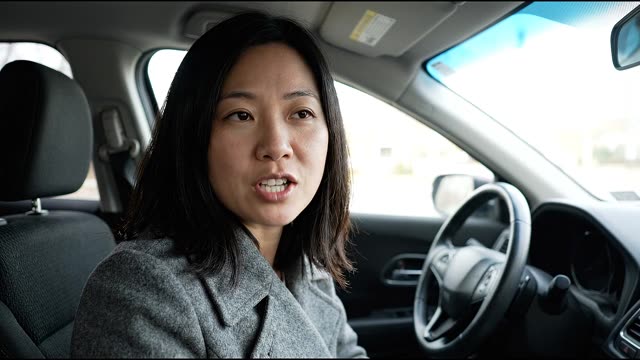
Connect HubSpot, Zendesk, Slack and Google Sheets natively, or use Zapier, n8n, signed webhooks and the REST API. Video answers arrive with their transcript and AI summary.

No credit card required. 28-day free trial.

0:08

New response · Report a car accident

Laura Chen

Tell us what happened

AI summary
Rear-ended by a van while stopped at a red light.
Sentiment
Negative
Keywords
rear end, trunk damage
Slack

New Form Response

Form: Report a car accident

Respondent: Laura Chen · laura.chen@example.com

Is everyone safe?Yes, everyone is okay

Tell us what happenedVideo/Audio response recorded

Watch VideoView Response

Zendesk
Subject
RecRam: Report a car accident
Requester
Laura Chen

Private note

AI Analysis: negative. Rear-ended by a van while stopped at a red light.

Video Transcript: “I was stopped at a red light, and a van rolled into my rear bumper. So this is the back. The bumper is cracked and the…”

Laura is a fictional sample respondent from the car accident demo. The message, ticket and row are drawn to match what each integration sends.

Trusted by forward-thinking teams

Bilisim Vadisi
Connivo
Cowealthy
Humon
Mobidictum
Novocycle
Saykal
Sigorta Hizli Teklif
Vaga
Bilisim Vadisi
Connivo
Cowealthy
Humon
Mobidictum
Novocycle
Saykal
Sigorta Hizli Teklif
Vaga
Definition

What does RecRam integrate with?

RecRam integrations send each form response to the tools your team already uses. HubSpot, Zendesk, Slack and Google Sheets connect natively, and Google Tag Manager, GA4 or Meta Pixel load on your public forms. Zapier, Make, n8n, signed webhooks and the REST API cover everything else.

Native integrations are set per form under Publish → Integrations. Responses with video or audio are delivered once transcription and AI analysis are done, so the transcript and summary arrive with them.

Native integrations

Connect once, then choose what each form sends

Connect the account once, then choose what each form sends. Settings are per form, so a recruiting form can feed Google Sheets while a support form opens Zendesk tickets.

CRMTurn respondents into contacts.

HubSpot

OAuth

Create or update a HubSpot contact for every response, with the answers logged on the contact’s timeline.

  • Create or update a contact, matched on the respondent’s email (the form needs an email field)
  • Fill name, phone and company from the contact question, and map any other question to a HubSpot contact property
  • Log a timeline note with every answer, video transcripts and a link to the full response in RecRam
  • Test the connection from the form builder before you publish
Set up:
Publish → Integrations → HubSpot. Connect your HubSpot account, choose the sync options, then map questions to properties.
Plans:
Every plan, including the free trial

SupportOpen a ticket for every response.

Zendesk

OAuth

Open a Zendesk ticket for each form response, with the respondent as requester.

  • Create a ticket per response, with the respondent’s email as the requester
  • Set the subject with {formName}, {respondent} and {date} placeholders, plus priority and tags
  • Add a private note with contact details, answers, the AI summary and sentiment, a transcript excerpt and a link to the response
  • Map form questions to your Zendesk custom ticket fields
Set up:
Publish → Integrations → Zendesk. Enter your Zendesk subdomain, authorize, then set the ticket defaults and field mapping.
Plans:
Every plan, including the free trial

ProductivityChannels and spreadsheets.

Slack

Add to Slack

Post a message to a Slack channel whenever a new response arrives.

  • Post to the channel you pick while adding RecRam to your Slack workspace
  • Each message shows the form name, contact details, the answers, and links to watch the video and open the response in RecRam
  • Choose per form which of those sections to include, and switch notifications on or off per form
  • Send a test message before going live
Set up:
Publish → Integrations → Slack. Click “Add to Slack”, pick the channel, then choose what each message includes.
Plans:
Every plan, including the free trial

Google Sheets

Google OAuth

Append a row to a spreadsheet for every response, with the columns you choose.

  • Pick a spreadsheet from Google Drive, or create a new one with a header row built from the form
  • Map each field to a column, or auto-map them in order
  • Optional timestamp and response ID columns; video transcripts, AI summary and sentiment are written after the answers
  • Send a test row; if appends keep failing, the sync pauses and the form shows a one-click reactivate
Set up:
Publish → Integrations → Google Sheets. Connect your Google account, choose the spreadsheet and sheet, then map columns.
Plans:
Every plan, including the free trial

Google CalendarComing soon

Google OAuth

Coming soon: add a follow-up event to your Google Calendar when a respondent answers an Appointment question.

  • Create an event on the calendar you choose when a response includes an Appointment answer
  • Title it with {formName} and {respondent}; the description carries contact details, the AI summary and a link to the response
  • Schedule it 1 hour, 1 day, 2 days or a week after the response, lasting 15 minutes to 2 hours
  • Optionally add the respondent as an attendee so Google sends them an invite
Set up:
Not available yet. Google Calendar is listed under Publish → Integrations as Coming soon and cannot be connected until it launches.
Plans:
Every plan, once it launches

AnalyticsMeasure form views and conversions.

Google Tag Manager, GA4 & Meta Pixel

Paste your ID

Load your own GTM container, GA4 property or Meta Pixel on the public form.

  • Add a GTM container ID, GA4 measurement ID or Meta Pixel ID to a form and RecRam loads the tags on the public form page
  • Every form sends a form_view event to the dataLayer and GA4, and PageView / ViewContent to Meta Pixel
  • Conversational forms also send form_start, question_answered and form_complete (Meta: InitiateCheckout, AddToCart, Lead), each switchable per provider
Set up:
Publish → Integrations → Tracking. Enable a provider and paste its ID.
Plans:
Every plan, including the free trial
Automation and developer

Reach any other tool with Zapier, Make, n8n, webhooks or the API

Use these when the app you need isn’t listed above. Zapier’s New Form Response, n8n’s Form Response Completed and the form.response.completed webhook all fire after transcription and AI analysis, so the transcript arrives with the response.

No-code automation

Zapier

Official app

Use the RecRam app on Zapier to send responses to thousands of other apps, no code.

  • Triggers: New Form Response (fires once the transcript and respondent details are ready), AI Analysis Complete, New Form
  • Actions: Create Contact and Create Form
  • Searches: Find Contact by email, Find Form by name, Find or Create Contact
  • Narrow the response trigger to a single form
Set up:
In Zapier, search for RecRam, sign in with your RecRam account, then pick a trigger or action.
Plans:
Starter and Professional (not during the trial)

Make

Webhook + HTTP

Connect Make scenarios through RecRam webhooks and the REST API. There is no dedicated Make app yet.

  • Start a scenario from a RecRam webhook pointed at Make’s custom webhook module
  • Choose the event: on submit, or after transcription and AI analysis are done
  • Read forms and responses with Make’s HTTP module and a RecRam API key
Set up:
Create a custom webhook in Make, then add its URL as a webhook in RecRam (Settings → Developer → Webhooks).
Plans:
Starter and Professional (not during the trial)

n8n

Community node

Install the n8n-nodes-recram community node to start n8n workflows from RecRam responses.

  • RecRam Trigger: Form Response Submitted (immediately) or Form Response Completed (after media encoding and AI analysis)
  • The trigger registers and removes its own webhook when you activate or deactivate the workflow
  • RecRam node: list or get forms, list or get responses
  • Authenticates with a RecRam API key and a configurable base URL, so it runs on self-hosted n8n too
Set up:
In n8n, open Settings → Community Nodes, install n8n-nodes-recram, then add your RecRam API key as a credential.
Plans:
Starter and Professional (not during the trial)

Webhooks and API

Webhooks

Your endpoint

POST each response to your own URL as signed JSON, on submit, or once transcription and AI analysis are done.

  • Subscribe to form.response.submitted, form.response.completed or form.response.analysis.complete
  • Every request is signed with HMAC-SHA256 in the X-Recram-Signature header, using a secret shown once at creation and rotatable later
  • Failed deliveries are retried with backoff; a 90-day delivery log lets you inspect and redeliver them
  • An endpoint that fails 5 times in a row is deactivated automatically until you switch it back on
  • For one form only, add a URL under Publish → Integrations → Webhook (signed in the body when you set a secret)
Set up:
Settings → Developer → Webhooks: add your endpoint, pick events, then copy the signing secret.
Plans:
Starter and Professional (not during the trial)

REST API

API key

Read and manage forms, responses, contacts, media and webhooks from your own code.

  • Authenticate with an API key in the X-API-Key header; create keys under Settings → Developer → API keys
  • Endpoints for forms, responses, captures, contacts, media, workspaces and webhook subscriptions
  • Filter responses by form or AI-analysis status, or ask for a flat format that’s easy to map
  • Scoped keys (for example forms:read or webhooks:write) with per-key rate limits reported in X-RateLimit headers
Set up:
Create a key in Settings → Developer → API keys, then call https://api.recram.com/v1 with the X-API-Key header.
Plans:
Starter and Professional (not during the trial)
Timing

Wait-for-AI delivery

When a response includes video or audio, RecRam holds the notifications until encoding, transcription and AI analysis are done, so what arrives already contains the transcript and summary.

  • Applies to webhooks and to the native integrations: HubSpot, Zendesk, Slack and Google Sheets
  • Need speed instead? Subscribe to form.response.submitted, which fires as soon as the form is submitted
  • In form.response.completed, each recording carries its video URL, thumbnail, duration, transcript and AI summary, sentiment and keywords

Example: form.response.completed, shortened

{
  "event": "form.response.completed",
  "api_version": "2026-09",
  "data": {
    "form_name": "Front Desk Agent",
    "contact": {
      "first_name": "Kenji",
      "last_name": "Sato",
      "email": "kenji.sato@example.com"
    },
    "fields": [
      {
        "title": "Handling an upset guest",
        "type": "video",
        "transcript": "I always listen actively without interrupting, validate their frustration, and then immediately offer two actionable solutions so they feel in control.",
        "transcript_status": "completed",
        "ai_analysis": {
          "summary": "Experienced night auditor with an excellent structural framework for de-escalating upset guests.",
          "sentiment": "positive",
          "keywords": ["night auditor", "problem solver", "Japanese speaker"]
        }
      }
    ]
  }
}
Values from Kenji's answer in the hotel hiring demo. Kenji is a fictional sample respondent.
Reviews on G2

Rated 4.6 out of 5 on G2

From HR, product and marketing teams who collect their answers on video.

Read all reviews on G2
“RecRam has solved my 'How do I leave a video testimonial?' problem. Rather than giving clients a confusing process, I now share a RecRam link... Easy as 1-2-3!”
Aaron D.Founder and Owner, Small-Business · G2 review

Integrations FAQ

RecRam connects natively to HubSpot (contacts and timeline notes), Zendesk (tickets), Slack (channel messages) and Google Sheets (a row per response), and loads Google Tag Manager, GA4 or Meta Pixel on the public form. A Google Calendar integration is coming soon. Everything else connects through the Zapier app, the n8n community node, webhooks or the REST API.

Still have questions? Chat with our team

Ready to transform feedback?

They won't type it.
But they'll show it.

Start collecting real feedback in video. See what your customers actually think and feel.

4.6 on G2Free for 28 days · No credit card · Cancel anytime