

AI video transcription
for every answer you collect.
Every video and voice answer comes back as time-stamped text in the language it was spoken. RecRam detects that language on its own (110+ supported), plays the words as captions, and lets you search, translate or download them.
No credit card required. 28-day free trial.

Susan Miller
Describe your symptoms · 0:08
Transcript
AI summary
Patient complains of a dry cough and shortness of breath lasting for two weeks.
A sample answer from a fictional patient in RecRam’s hospital intake demo form.
Trusted by forward-thinking teams









What is AI video transcription?
AI video transcription turns the speech in a recording into written text automatically. In RecRam, every video and voice answer is transcribed as soon as it arrives: the spoken language is detected, the text is cut into short time-stamped lines, and those lines become the answer’s searchable transcript and its captions.
Typed answers are already text, so they are not transcribed. Each transcript is also what the answer’s AI summary, keywords and sentiment are read from.
How AI analysis worksHow a recording becomes text
- 01
The words
A speech model writes down everything that was said, first word to last, and names the language it heard. Long recordings are cut into ten-minute parts that are transcribed side by side.
- 02
The timing
A second pass times those exact words, in lines of up to ten words and five seconds broken at natural pauses. Asking for the words and the times separately keeps whole sentences from going missing.
- 03
The answer
The lines land on the answer: as a transcript you can search and click, as captions on its player, and as the text its AI summary is written from.
Read it, search it, jump to the moment
Open an answer and its transcript sits beside the player. The line being spoken lights up, a click on any line plays from there, and the search box narrows the transcript to the lines that match.
Tell us what happened
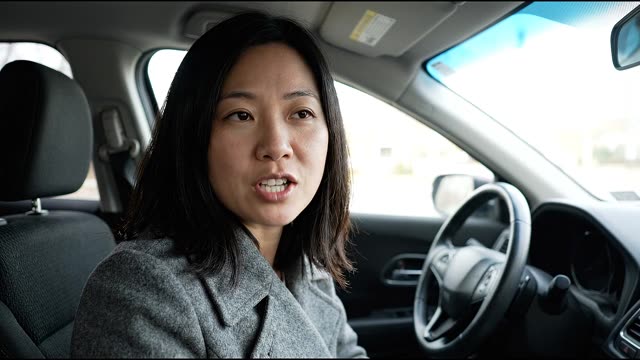
- Captions in the player
- The same lines play as subtitles on the answer’s video, in step with the voice.
- Download as SRT
- Save any transcript as an .srt subtitle file with its timestamps, or as plain text when a recording has no timed lines.
- Voice answers too
- A voice answer shows the line being said, large, under its audio player, and gets the same searchable transcript.
Sample answers from fictional drivers in RecRam’s car insurance claim demo form. The words are their transcripts; the line times on this page were measured from each clip, RecRam times every new answer itself.
See video formsRead any answer in your own language
Pick a language on an answer and its transcript is translated line by line with the timestamps kept, so the captions on the player switch with it. Switch back and the original is still there.
Mateo Silva
Voice answer · How have you been since your last visit?
Original · English
Mateo is a fictional patient in RecRam’s hospital intake demo form. The English is his transcript; the translations are examples written for this page, not product output.
Captions for the videos you record, too
Answers are transcribed on their own. The videos you record to ask your questions are a separate thing: in the form builder, one click writes captions for a screen’s video, you correct any line, and the form shows them while the video plays muted.

Captions
- 0:00.0 – 0:02.5Hi, I'm
SophiaSofia fromClaims.claims. - 0:02.5 – 0:04.5I'm sorry this happened.
- 0:04.5 – 0:08.0Let's get your claim started.
The speech model heard “Sophia” and “Claims”. One edit and the line matches the form.
- Priced before you start
- Host captions use AI credits. The builder shows the cost first, and nothing is charged when no speech is found or the run fails.
- Saved with the form
- Captions belong to the form screen, so the same video can carry different captions in different forms. Each screen can switch them off.
- Clips on a Showcase wall
- Each clip on a Video Showcase wall gets captions you can edit line by line before the wall goes live.
Real captions RecRam generated for the host video on its car insurance claim demo form, shown before and after one edit.
See Video ShowcaseFive products, one bill
Every plan includes all of them. Start with video forms and add the rest when you need them.
Video Forms
Ask questions by video and collect video, voice, screen or text answers through one link.
Explore Video FormsAI Analysis
Transcripts, summaries, keywords and sentiment on every answer, plus your own AI questions and rules.
Explore AI Analysis
Video Magnet
Put a form on any website as a corner video that opens as a side panel, popup or full page, with triggers you control.
Explore Video Magnet
Room
Async one-to-one video threads. Send a link, they record, you reply in the same thread.
Explore Room

Works with the tools you already use
Connect RecRam to the tools you already use: native apps, no-code automation or your own code.
Webhooks & API
Receive real-time notifications and full API access to build RecRam directly into your own product.
Zapier
Connect with thousands of apps via Zapier. Trigger actions instantly when a video form is submitted.
Make
Receive RecRam responses with a webhook and route them to any app in a visual Make scenario.
n8n
Fair-code workflow automation. Trigger complex logic directly and self-host your data securely.
Native integrations
HubSpot, Zendesk, Slack, Google Sheets, Google Calendar, plus GTM, GA4 & Meta Pixel
Connect the account once, then choose per form what each response sends: CRM contacts, support tickets, channel posts, spreadsheet rows or calendar events.
Rated 4.6 out of 5 on G2
From HR, product and marketing teams who collect their answers on video.
Read all reviews on G2“RecRam has solved my 'How do I leave a video testimonial?' problem. Rather than giving clients a confusing process, I now share a RecRam link... Easy as 1-2-3!”
Start in under 2 minutes
Video Interview: First Round
Allows candidates to record video responses to initial screening questions, providing a dynamic assessment of communication and personality.
4 questions
Candidate Screening: Culture Fit
Assesses a candidate's alignment with company values and culture through behavioral questions and scenario-based responses.
4 questions · branching
Candidate Application Form: Entry Level
Collects essential information from entry-level job applicants to assess basic qualifications and suitability for initial roles.
5 questions
Transcription FAQ
Still have questions? Chat with our team
They Won't Type It.
But They'll Show It.
Start collecting real feedback in video. See what your customers actually think and feel.